Hidden Camera Detector
The Ultimate Guide to the Hidden Camera Detector App: Protect Your Privacy and Secure Your Personal Space
In our modern, technology-driven world, the incredible advancements in miniaturized electronics have brought us countless conveniences. However, this rapid technological progress also comes with a significant dark side. Today, tiny, highly sophisticated surveillance cameras can be easily purchased online by anyone and discreetly hidden in everyday objects. From hotel rooms and vacation rental properties to public changing rooms and even corporate offices, the unsettling threat of unauthorized surveillance is a growing concern. Your personal privacy matters more than ever, and fortunately, the very smartphone you carry in your pocket every day can be transformed into a powerful defensive tool. The Hidden Camera Detector app is ingeniously designed to help you detect and locate hidden spy cameras using your mobile phone’s built-in hardware sensors and advanced camera features. In this comprehensive guide, we will explore exactly how this technology works, how you can use it to protect yourself, and vital safety tips to ensure your ultimate peace of mind.
Why Personal Privacy Protection is More Critical Than Ever Before
Privacy is a fundamental human right. When we close the door to a hotel room or step into a dressing room, we operate under the basic assumption that we are completely alone. Unfortunately, bad actors sometimes exploit these vulnerable moments. Hidden cameras, often referred to as “spy cams” or “nanny cams,” have become astonishingly small—sometimes no larger than the head of a pin. They can be seamlessly integrated into innocent-looking objects such as digital alarm clocks, USB phone chargers, smoke detectors, decorative flowerpots, and even bathroom showerheads.
The psychological impact of discovering that you have been secretly recorded without your explicit consent is devastating. This is exactly why being proactive about your digital and physical security is absolutely essential. You do not need to be a professional cybersecurity expert or carry expensive, specialized counter-surveillance military equipment to stay safe. By leveraging the advanced sensors already packed inside your modern Android or iOS smartphone, the Hidden Camera Detector app acts as your personal, portable security guard, empowering you to take immediate control of your surroundings.
Deep Dive: How the Hidden Camera Detector App Actually Works
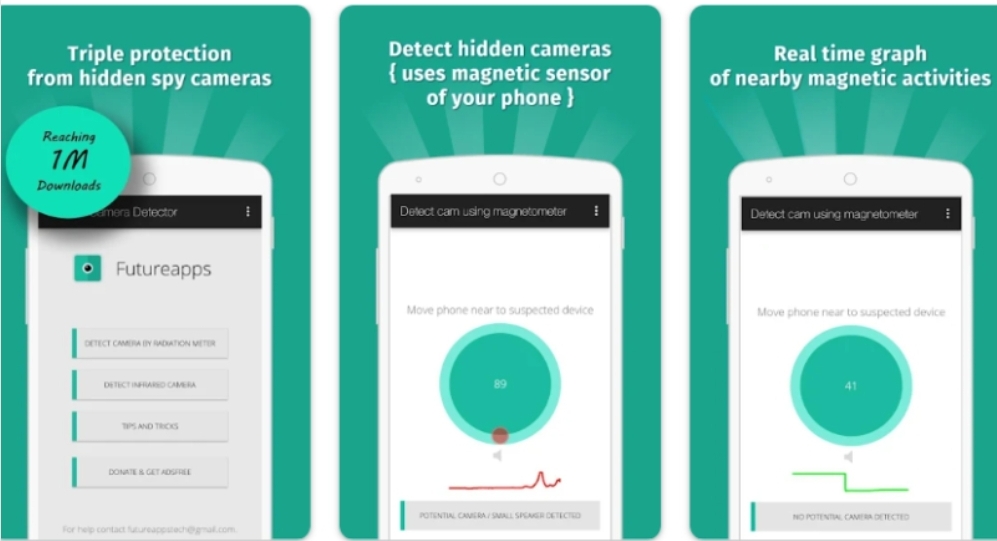
To truly trust and utilize this application effectively, it is highly beneficial to understand the underlying science and technology that powers it. The app primarily relies on two distinct, highly effective detection methods: Magnetometer Analysis and Infrared Light Detection.
1. Magnetometer Detection: The Science of Magnetic Fields
Almost every modern smartphone contains a built-in hardware component called a magnetometer. This is the exact same microscopic sensor that allows your phone’s digital compass app to know which direction is North. The Hidden Camera Detector app brilliantly repurposes this sensor to hunt for electronic surveillance devices.
Every single electronic camera requires specific metallic components to function, such as conductive wires, a battery, and electromagnetic coils within the lens focusing mechanism. When an electronic device is powered on, it naturally generates a localized electromagnetic field. By carefully sweeping your phone near a suspected object, the app’s sophisticated algorithm analyzes the surrounding magnetic activity in real-time. If the magnetometer detects a sudden, sharp spike in magnetic radiation that closely matches the specific electronic signature of a camera, the app will instantly trigger a loud audible beep and raise a visual alarm on your screen, alerting you to investigate the object much closer.
2. Infrared (IR) Camera Detection: Seeing the Invisible
Many hidden cameras are specifically designed to record video in total darkness. To achieve this, they utilize Infrared (IR) LEDs to illuminate the room. To the naked human eye, this infrared light is completely invisible, meaning you could be staring directly at an active night-vision camera in a dark room and never even know it.
However, your smartphone’s camera lens is actually highly sensitive to the infrared spectrum. The Hidden Camera Detector app features a specialized Infrared Camera Detection tool that applies a unique luminescence effect. When you open this tool and scan a dark room, any active infrared lights emitted by a hidden spy camera will boldly appear on your phone’s screen as bright, glowing white or purple dots. This effectively allows you to “see the invisible” and instantly pinpoint the exact location of the surveillance device.
A Step-by-Step Guide: How to Use the App for Maximum Effectiveness
Downloading the app is only the first step. To guarantee your safety, you must know how to properly utilize its features. Follow this detailed, step-by-step methodology whenever you enter a new, unfamiliar private space:
Step 1: Locate Your Phone’s Magnetic Sensor
Before you begin scanning, you need to know exactly where the magnetometer is physically located inside your specific phone model, as it varies between manufacturers. To find it, open the app’s Magnetometer feature. Take another electronic device (like a TV remote or a laptop speaker) and slowly slide your phone over it. Pay close attention to which part of your phone—usually the top edge or the bottom corner—causes the app to register the highest magnetic reading and beep the loudest. This specific spot is your phone’s sensor “sweet spot.” Always point this exact spot directly towards the objects you are actively scanning.
Step 2: Conduct a Methodical Magnetic Sweep
Once you know where your sensor is, slowly and methodically move your phone around the room. Do not rush. Hold the phone a few inches away from suspicious objects. Pay special, close attention to the following high-risk areas:
- Bathroom mirrors (check for two-way glass).
- Smoke detectors mounted on the ceiling.
- Digital alarm clocks or radios sitting on nightstands.
- Wall outlets, light switches, and bulky power adapters.
- Showerheads and bathroom ventilation grates.
- Small decorative items like stuffed animals, picture frames, or flowerpots.
If the app begins to beep frantically, stop immediately. Put your phone down and conduct a thorough, manual visual inspection of the object to look for a tiny glass lens.
Step 3: Perform an Infrared Sweep in the Dark
After your magnetic sweep, turn off every single light in the room and close the heavy curtains so that the space is as pitch-black as possible. Open the app’s Infrared Detector tool. Slowly pan your phone across the entire room in a smooth, 360-degree motion, carefully watching your phone’s screen. If you spot a bright white, glowing dot on your screen that you cannot see with your naked eye, you have likely just discovered an active night-vision camera.
Extra Safety Tips and Best Practices
While the Hidden Camera Detector app is an incredibly powerful digital tool, it should always be combined with traditional, common-sense security practices for the absolute best protection:
- The Flashlight Test: Turn off the lights and shine a bright flashlight (or your phone’s flash) slowly around the room. Camera lenses are made of curved glass, meaning they will inevitably catch the light and reflect a tiny, noticeable “glint” back at you.
- Examine the Wi-Fi Network: Modern hidden cameras often stream their recorded video live over the internet. Check the available Wi-Fi networks in your location. If you see a strangely named open network with a strong signal, or a network name containing words like “Cam” or “IP,” be highly suspicious.
- Trust Your Instincts: If an object looks completely out of place—such as a smoke detector placed directly above a bed instead of the center of the room, or a charger plugged into an outlet facing the shower—investigate it immediately.
- Share Suspicious Locations: The app features an easy location-sharing tool. If you discover a device, safely document it, share the location with trusted friends or family, and immediately report it to the local authorities or hotel management.
Frequently Asked Questions (FAQ)
My phone does not have a magnetic sensor. Is the app useless to me?
Not at all! While you will not be able to use the magnetometer to detect electromagnetic fields, you can still fully utilize the highly effective Infrared Detector feature to scan for night-vision cameras. For a complete magnetic scan, you might consider borrowing a friend’s device that contains the necessary hardware.
Why does the app occasionally beep when I scan near plain metal objects?
The magnetometer detects magnetic fields, and certain types of heavy metals or dense electronics can sometimes exhibit minor magnetic activity that closely mimics a camera, causing a false positive. The app is a warning system, not a magic wand. If it beeps, always perform a manual visual check to see if an actual camera lens is present.
Do I still need to check the room manually if I use this app?
Absolutely, yes. The app is designed to analyze invisible magnetic and infrared signals, but it cannot physically “see” a lens. Think of the application as your advanced early warning radar system. If the radar goes off, you must use your own eyes to confirm the threat.
The Infrared Detector is showing a black screen or not responding. What should I do?
This usually happens because another application running in the background of your phone (such as Snapchat, Instagram, or your default camera app) is currently holding onto the camera hardware permissions. Simply close all other apps, restart the Hidden Camera Detector, and try again.
Final Word on Protecting Your Privacy
In an age where privacy feels increasingly fragile, taking proactive steps to protect yourself is not paranoid; it is incredibly smart and necessary. The Hidden Camera Detector app is a formidable, easy-to-use tool designed to help safeguard your personal space from invasive surveillance. While no single piece of software is one hundred percent flawless, this application provides an incredibly strong first line of defense, immediately alerting you to potential hidden threats so that you can take swift, decisive action. By combining the powerful technology inside your smartphone with your own careful observation, you can confidently reclaim your privacy and enjoy true peace of mind, no matter where your travels may take you.
Tags: Hidden Camera Detector, Find Spy Camera, Privacy Protection App, Infrared Camera Finder, Detect Hidden Cameras, Magnetometer App, Hotel Room Security, Counter Surveillance, Anti Spy App, Protect Personal Privacy, Android Security Tools, Detect CCTV.

Leave a Comment